Welcome to my blog! My name is Andre Chua and I am from Hwa Chong Institution. I enjoy sports (all kind of sports, especially swimming, basketball and table tennis). I like to spend my weekends playing basketball with my siblings or friends. Also, I enjoy listening to music.
Takeaways on the topic 'The Internet and the World Wide Web'
The Internet
Internet has grown from 4 host nodes in 1969 to 200 million host nodes today. It is open to the public and can be connected in different ways. There are slow-speed technology and high-speed connection to the internet. The ways to access the Internet are ISP, OSP and Wireless Internet Service Provider. A domain name is the text version of the IP (Internet protocol) address. An IP address is the number that uniquely identifies each computer device connected to the internet.
World Wide Web (WWW)
World Wide Web is a worldwide collection of electronic documents. Each electronic document is called a Web page and a Website is a collection of related Web pages. A Web browser is program that allows you to view Web pages (i.e. Mozilla, Microsoft Internet Explorer and Safari).
Web Sites
The first page that a Web site presents is a home page. It often provides connection to other Web pages.URL stands for Uniform Resource Locator. It is a unique address for a Web page which a web server delivers to your computer. A link is a built-in connection to another related Web page location.
Search Engine
A search engine is program used to find Web sites and Web pages by entering keyword.A hit is any Web site name that is listed as a result of a search.
Basics of Web Sites
There are 9 basic types of Web sites. They are portal, news, informational, business/marketing, educational, entertainment, advocacy, blog and personal.
·Portal:A Web site that offers a variety of services from one, convenient location, usually for free
·News:Contains newsworthy material; stories and articles relating to current events, life, money, sports, and the weather
·Informational: Contains factual information; created by organizations and government agencies
·Business/Marketing: Contains content that promotes products or services; allows you to purchase products or services online
·Educational: Offers avenues for formal and informal teaching and learning
·Entertainment: Offers an interactive and engaging environment featuring music, video, sports, games, and more
·Advocacy: Contains content that describes a cause, opinion or idea
·Blog: Uses a regularly updated journal format to reflect the interests, opinions, and personalities of the author and sometimes site visitors
·Personal: Uses a regularly updated journal format to reflect the interests, opinions, and personalities of the author and sometimes site visitors
Guidelines
The guidelines for evaluating the value of a Web site are affiliation, audience, authority, content, currency, design and objectivity.
Multimedia
A multimedia is an application integrating text with other media elements, such as graphics, animation, audio, video and virtual reality.
·Graphic: The graphic formats used on the web are BMP, JPEG, PNG, GIF and TIFF. A thumbnail is Small version of a larger graphic.
·Animation: An appearance of motion created by displaying a series of still images insequence.
·Audio: Music, speech, or any other sound; individual compressed sound files that you download from the Web to your computer.
·Videos: Consists of full-motion images that are played back at various speeds.
·Virtual Reality: Use of computers to simulate real or imagined environment; appears as a three dimensional (3-D) space.
E-mail
E-mail is the short form of electronic mail. An e-mail is the transmission of messages and files via a computer network.Messages can consist of simple text or can contain attachments, such as documents, graphics, or audio/video clips. An e-mail is one of the original services on the Internet. An e-mail address is a unique name that consists of a user name and domain name that identifies the user.
Chat
Chat is a real-time typed conversation that takes place on a computer. A chat room is a location on server that permits users to discuss topics of interest.
Discussion groups
A newsgroup is an online area where users discuss a particular subject while a message board is a type of discussion group. Many Web sites use message boards because they are easier to use.
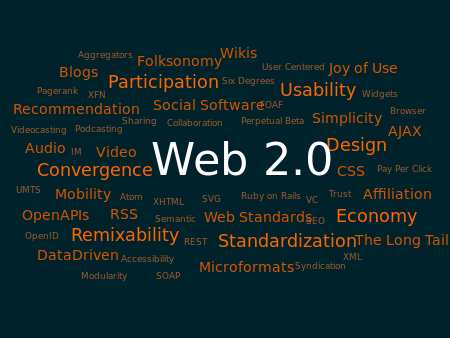
A Web 2.0 site may allow users to interact and collaborate with each other in a social media dialogue as creators of user-generated content in a virtual community, in contrast to Web sites where people are limited to the passive viewing of content. Examples of Web 2.0 include social networking sites, blogs, wikis, folksonomies, video sharing sites, hosted services, Web applications, and mashups.
Web 2.0 sites allow users to do more than just retrieve information. Instead of merely 'reading', a user is invited to 'write' as well, or contribute to the content available to everyone in a user friendly way. They provide the user with more user-interface, software and storage facilities, all through their browser. Major features of Web 2.0 include social networking sites, user created Web sites, self-publishing platforms, tagging, and social bookmarking. Users can provide the data that is on a Web 2.0 site and exercise some control over that data.
Characteristics
Web 2.0 offers all users the same freedom to contribute. While this opens the possibility for serious debate and collaboration, it also increases the incidence of "spamming" and "trolling" by dishonest or distrustful users. The impossibility of excluding group members who don’t contribute to the provision of goods from sharing profits gives rise to the possibility that serious members will prefer to withhold their contribution of effort and free ride on the contribution of others. This requires what is sometimes called radical trust by the management of the Web site. The characteristics of Web 2.0 are: rich user experience, user participation, dynamic content, metadata, Web standards, and scalability. Further characteristics, such as openness, freedom and collective intelligence by way of user participation, can also be viewed as essential attributes of Web 2.0.
Technologies
The client-side (Web browser) technologies used in Web 2.0 development include Ajax and JavaScript frameworks such as YUI Library, Dojo Toolkit, MooTools, jQuery, Ext JS and Prototype JavaScript Framework. Ajax programming uses JavaScript to upload and download new data from the Web server without undergoing a full page reload.
To allow users to continue to interact with the page, communications such as data requests going to the server are separated from data coming back to the page (asynchronously). Otherwise, the user would have to routinely wait for the data to come back before they can do anything else on that page, just as a user has to wait for a page to complete the reload. This also increases overall performance of the site, as the sending of requests can complete quicker independent of blocking and queuing required to send data back to the client
.
Concepts
Web 2.0 draws together the capabilities of client- and server-side software, content syndication and the use of network protocols. Standards-oriented Web browsers may use plug-ins and software extensions to handle the content and the user interactions. Web 2.0 sites provide users with information storage, creation, and dissemination capabilities that were not possible in the environment now known as "Web 1.0".
Usage
A third important part of Web 2.0 is the Social web, which is a fundamental shift in the way people communicate. The social Web consists of a number of online tools and platforms where people share their perspectives, opinions, thoughts and experiences. Web 2.0 applications tend to interact much more with the end user. As such, the end user is not only a user of the application but also a participant by Podcasting, Blogging, Tagging, Curating with RSS, Social bookmarking, Social networking and Web content voting.
HTML or HyperText Markup Language is the standard markup language used
to create web pages.HTML is written in the form of HTML elements consisting of tags
enclosed in angle brackets. HTML tags most commonly come in pairs.
HTML basics
The HTML basics include of headings, paragraph, links and images.
HTML elements
HTML elements form the building blocks of all websites. HTML allows
images and objects to be embedded and can be used to create interactive forms.
It provides a means to create structured documents by denoting structural
semantics for text such as headings, paragraphs, lists, links, quotes and other
items. It can embed scripts written in languages such as JavaScript which
affect the behavior of HTML web pages.
Markup
HTML markup consists of several key components, including tags, character-based
data types, character references and entity references. Another important
component is the document type declaration, which triggers standards mode
rendering.
Data types
HTML defines several data types for element content, such as script data
and style sheet data, and a plethora of types for attribute values, including
IDs, names, URIs, numbers, units of length, languages, media descriptors,
colors, character encodings, dates and times. All of these data types are
specializations of character data.
Delivery
HTML documents
can be delivered by the same means as any other computer file. However, they
are most often delivered either by HTTP from a web server or by email.
CSS
What is CSS?
CSS, short form of Cascading Style Sheets, is a style sheet language
used for describing the look and formatting of a document written in a markup
language. It is most often used to style web pages and interfaces written in
HTML.
Abilities
CSS can allow the same markup page to be presented in different styles
for different rendering methods, such as on-screen, in print, by voice and on
Braille-based, tactile devices. It can also be used to allow the web page to
display differently depending on the screen size or device on which it is being
viewed.
Use
CSS allows authors to move much of that information to another file, the
style sheet, resulting in considerably simpler HTML.
Sources
CSS information can be provided from various sources. These sources can
be the web browser, the user and the author. The information from the author
can be further classified into inline, media type, importance, selector specificity,
rule order, inheritance and property definition. CSS style information can be
in a separate document or it can be embedded into an HTML document. Multiple
style sheets can be imported. Different styles can be applied depending on the
output device being used.